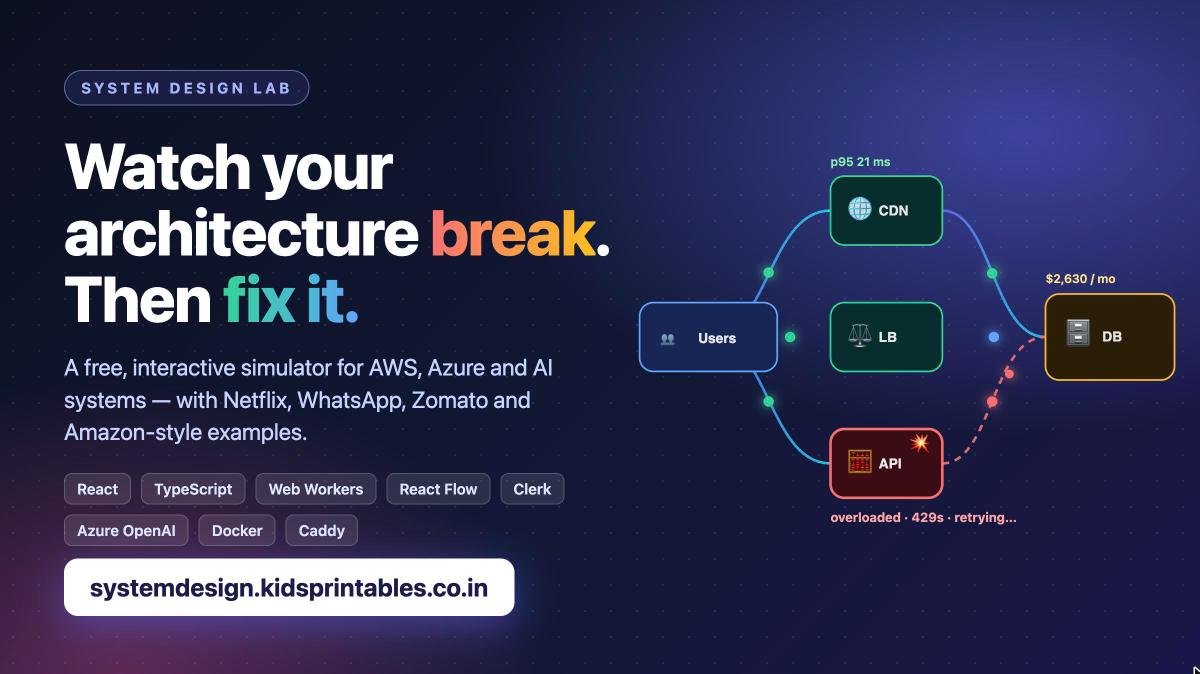
System Design Lab, a free interactive simulator for cloud and AI architectures
Most system design learning is slides and whiteboards: "add a cache here, a queue there". You nod along, but you never see the server fall over, the database melt, or the retry storm that keeps an outage going after the original fault is gone.
So I built System Design Lab: you drag components onto a canvas, wire them together, press Play, and watch animated requests flow through your design. Push the traffic up and the system breaks in front of you. Add the right building block (cache, queue, load balancer, replicas) and it recovers.
👉 Try it free: systemdesign.kidsprintables.co.in
No account needed, except for the AI generator.
What you can do with it
- Build architectures from 100+ components: generic building blocks, AWS services (EC2, ALB, RDS, DynamoDB, SQS, Lambda, Kinesis…), Azure services (VMSS, Cosmos DB, Service Bus, Functions…) and AI pieces (LLM APIs, GPUs, vector databases, semantic caches, agents).
- Watch health in real time: green, stressed, overloaded, crashed, recovering, with CPU/RAM gauges, queue depth, p95 latency, error rate and a live monthly cost.
- Break things on purpose: kill a node, add 500 ms of latency, cut a link, fail an entire availability zone, or hit it with a ×10 traffic spike.
- Learn by doing with 21 guided lessons (basics, an AWS track, an Azure track and an AI track), each with goals that are checked automatically, plus hints.
- Compare two designs on identical traffic, side by side. Is the AWS version cheaper than Azure? Is the cached one faster?
- Export your design as PNG or JSON and import it back later.
Popular systems, as examples
One click loads a simplified, scaled-down architecture inspired by public engineering talks: Netflix, WhatsApp, Zomato, Amazon, Flipkart (a flash sale), Uber, Instagram, Twitter/X, Airbnb and a ChatGPT-style assistant. Each one opens with a card explaining what to notice and what to try.
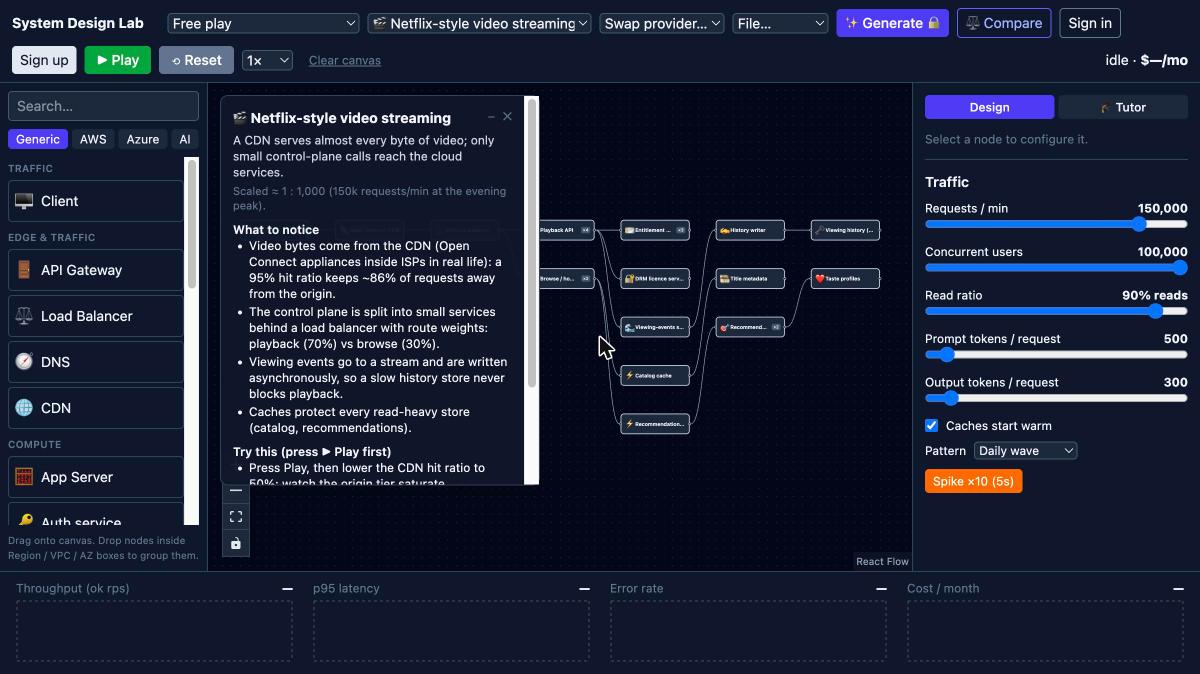
The Netflix-style example: a CDN serves almost every video byte, so only small control-plane calls reach the cloud services
Press Play and the same design comes alive. Below, the Netflix-style system serves about 1,900 requests per second at a 21 ms p95 with 0% errors for roughly $2,600 a month (illustrative prices). Lower the CDN hit ratio and watch the origin tier saturate: that is the lesson.
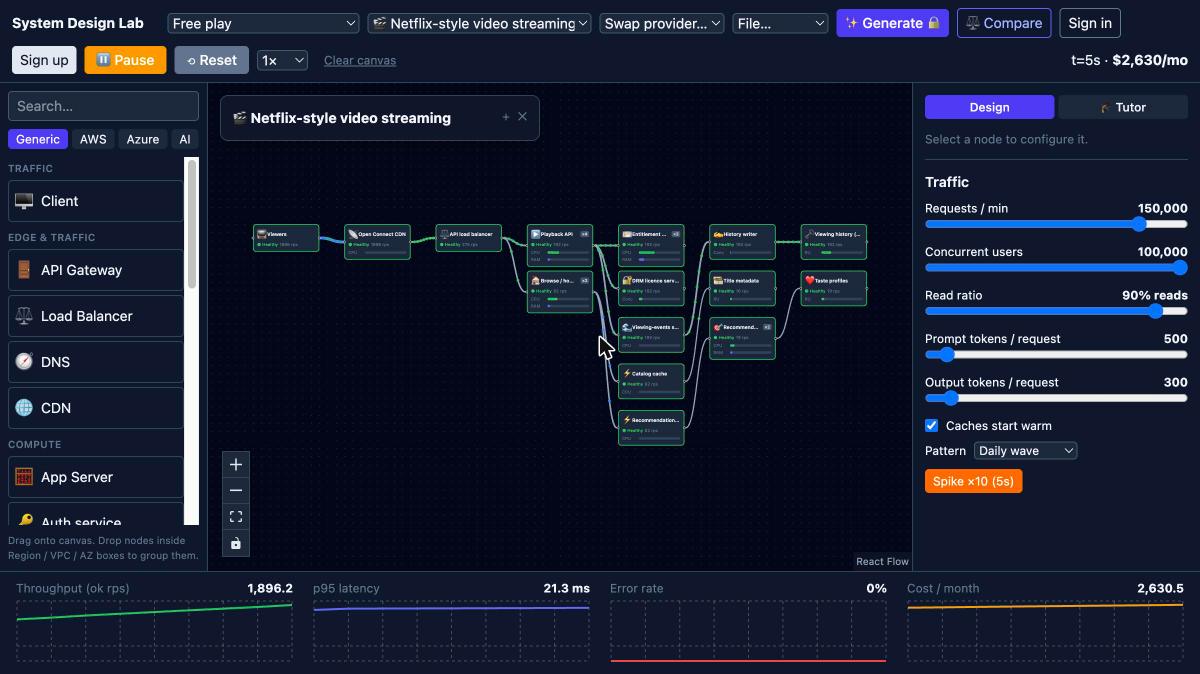
The running simulation with live throughput, p95 latency, error rate and cost charts
Note: these are illustrations for learning, not the real architectures of those companies, and the numbers are scaled down.
Compare designs before you build them
Compare mode runs two designs side by side under the same traffic and tells you the winner per metric. Here, a multi-AZ 3-tier web app on AWS against the zone-redundant equivalent on Azure, at about 12,000 requests per minute:
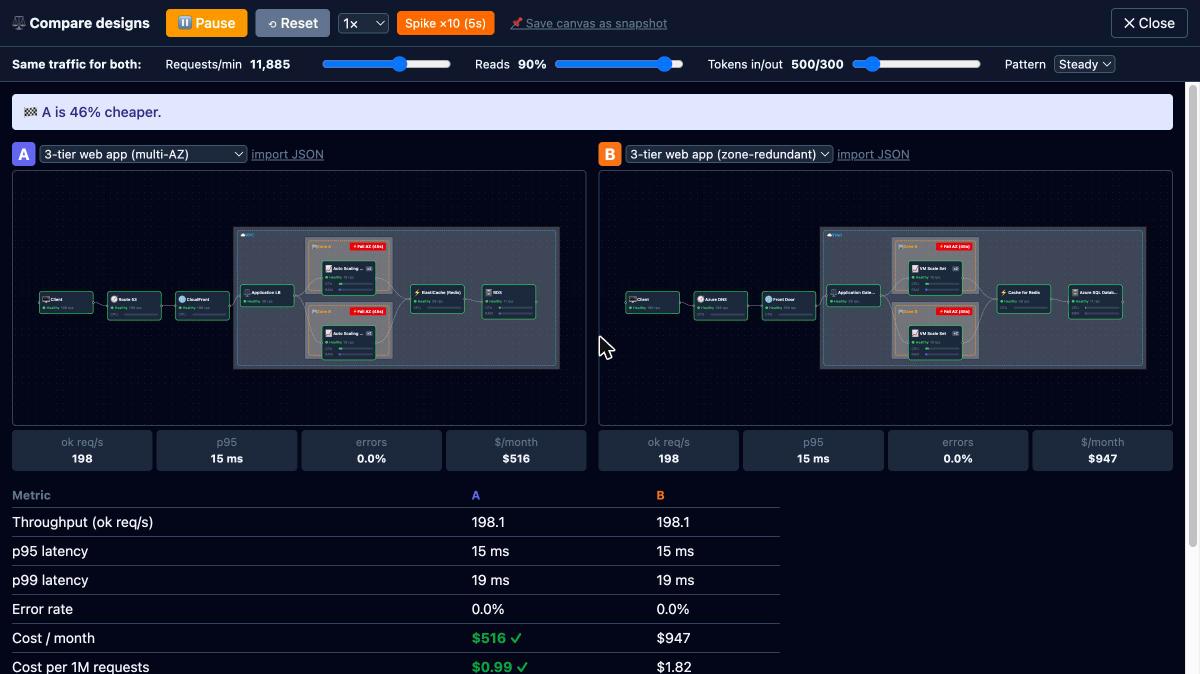
Same traffic, same latency; the AWS build comes out about 46% cheaper with the (illustrative) price snapshot
An AI tutor that explains the bottleneck
Lesson 3, "The DB is melting", has four healthy web servers hammering one database with 95% reads. The tutor reads the design and the running simulation and says exactly what is wrong and what to try: the database crashed because its backlog consumed its RAM; put a cache between the app tier and the database. It is rule-based and runs locally in your browser.
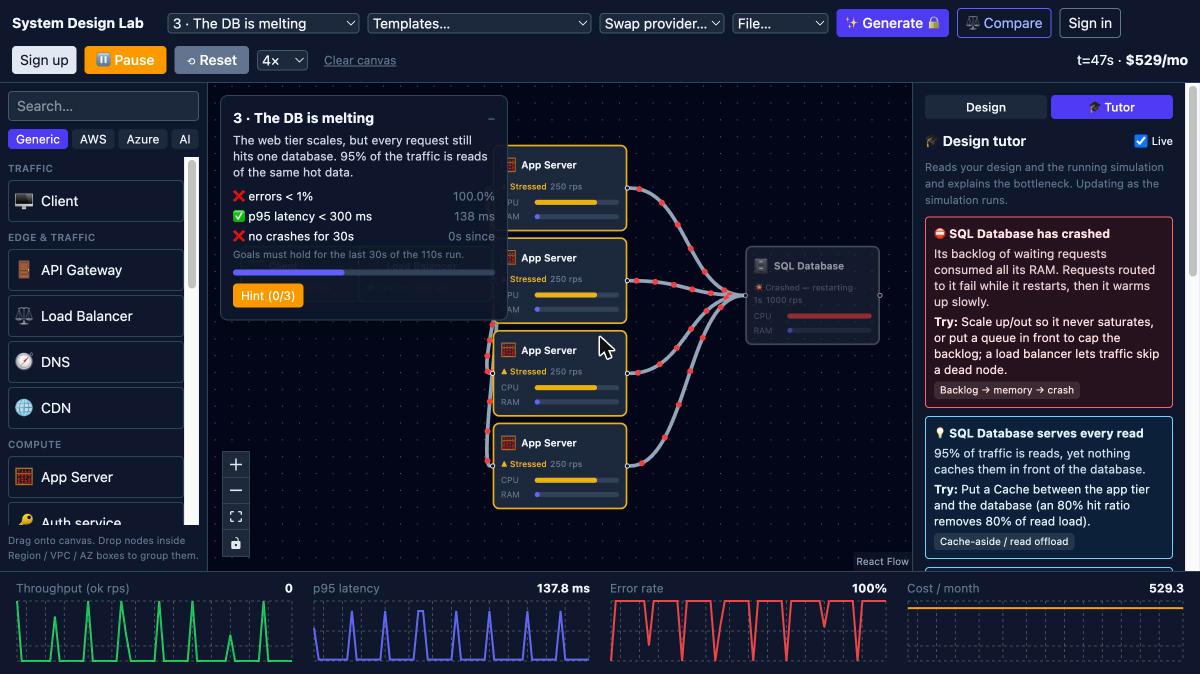
Lesson 3 failing at 100% errors, with the tutor diagnosing the crashed database and suggesting a cache
Describe a system, let AI design it
Type requirements in plain words, for example "a food-delivery app, 50,000 orders a day with lunch and dinner peaks, must survive losing one availability zone, under $4,000 a month", and an LLM proposes an architecture. It does not stop there:
- The answer is validated against the real component catalog, and made-up services and out-of-range numbers are corrected.
- The design is laid out automatically (with availability-zone boxes) and simulated at the stated peak traffic.
- If something crashes or drops requests, the model is shown the simulator report and asked to fix it, up to two rounds.
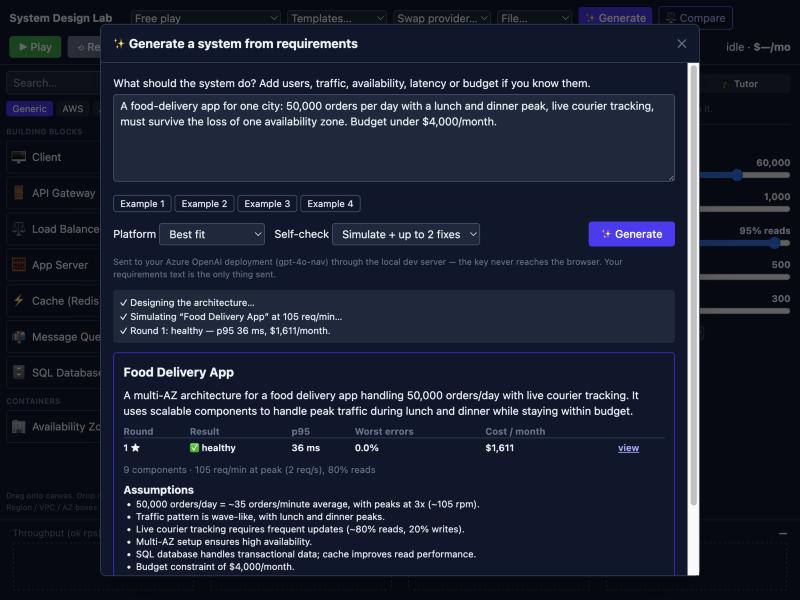
The result of the generator: a multi-AZ design the simulation judged healthy, with assumptions and the reason for each component
It only designs systems: off-topic or prompt-injection requests are refused, and the output of the model is only ever accepted as a catalog-validated design. This is the one feature that needs a free account, with a limit of 10 design requests per day to keep costs sane.
How the simulation works
The engine is a tick-based, queueing-theory-inspired model. The goal is believable cause and effect, not benchmark accuracy.
- Every 100 ms of simulated time each node computes its utilisation ρ = arrivals ÷ capacity. Latency grows as ρ approaches 1; beyond 1, requests queue, and that backlog eats RAM until the node crashes, restarts and warms up again.
- Caches start warm or cold, queues absorb bursts and redeliver what a slow consumer rejects, and autoscaling is not instant (warm-up time matters).
- Failures cascade: clients retry, retries multiply load, and a circuit breaker with backoff is what ends the storm.
- Load balancers pick one target, while app servers call all of their dependencies, so a slow dependency slows the whole request.
- Network distance costs time (same zone, across zones, across regions), and cloud limits are modelled: Lambda concurrency, DynamoDB capacity, Kinesis shards, API Gateway throttles.
- AI systems are simulated in tokens: TPM quotas and 429s, GPU batching versus VRAM, vector-database latency, semantic caches, agent fan-out.
The tech behind it
| Frontend | React 18, TypeScript, Vite, Tailwind CSS, Zustand for state |
| Canvas and charts | React Flow (nodes, edges, nested availability-zone boxes), SVG request particles, Recharts, Framer Motion |
| Simulation | A pure TypeScript engine running in a Web Worker, so the UI stays at 60 fps; fully unit-tested with Vitest (about 250 tests, including every lesson being solvable) |
| Auth | Clerk sign-in; the server verifies the session JWT on every AI request |
| AI | Azure OpenAI behind a small Node proxy: the key never reaches the browser, a scope guard keeps it on topic, and a SQLite counter enforces the daily limit |
| Hosting | One small Docker container (about 20 MB of RAM) on a 2 GB VPS behind Caddy (automatic HTTPS), with DNS and CDN from Cloudflare |
Browser (React app + simulation in a Web Worker)
   |  HTTPS via Cloudflare
Caddy (automatic certificates)
   |
Node container: static app + /api/ai
   |-- Clerk: verify the session token
   |-- SQLite: 10 design requests / user / day
   '-- Azure OpenAI: scope-guarded design generation
Honest limits
It is a teaching tool, not a benchmark. Percentiles come from a formula rather than a real latency distribution, retries and timeouts exist only on the client, hot keys and sharding are not modelled, and all prices are illustrative snapshots for relative comparison. The point is the right intuition: where the bottleneck is, and which building block fixes it.
Give it a try
Start with lesson 1 (a single server falling over), then open a template, press Play and break something. If you build something interesting, export it as JSON and share it.
🔗 systemdesign.kidsprintables.co.in
Feedback and ideas are welcome in the comments: which system should I add next?